

Voice to text
Private voice to text in any app
Clavox turns your voice into clean text in whatever app you’re using, and it does it on your own computer. Nothing you say is uploaded, stored on a server, or used to train anything.
What “private” should mean for voice to text
Voice to text has become normal: on phones, in meeting tools, in chat apps. Most of it works the same way. Your microphone records you, the audio is sent to a company’s servers, and text comes back. Some services keep the recordings. Some use them to improve their models. Most ask you to trust a privacy policy you will never read.
When we say Clavox is private, we mean something simpler: your voice never leaves your computer. Speech recognition and the AI editing that cleans up your words both run on your machine. There’s no account that stores your dictations in the cloud, and no setting you have to find to turn uploading off, because there is no uploading.
- 0 words sent to us.
- 0 recordings uploaded.
- 0 tracking in the app.
Sending your words to us or anyone else is architecturally impossible, so nobody can read them, sell them, or train on them.
Voice to text that works in every app
Clavox isn’t a separate notepad you dictate into and copy from. Put your cursor wherever you’d normally type, press the shortcut, and talk. When you stop, the text is typed straight into that app.
That includes the places you write every day: Gmail, Outlook, Apple Mail, Slack, Microsoft Teams, WhatsApp, Discord, Messages, LinkedIn, Notion, Obsidian, Google Docs, Word, ChatGPT, VS Code and Cursor. If you can type there, Clavox can type there.
Not just your words: what you meant
Ordinary voice to text writes down exactly what you said, which is rarely what you want to send. Clavox is voice intelligence, not just dictation:
- Fillers are gone. The ums, the uhs and the “you know”s don’t make it into your text.
- Changes of mind are followed. Say “let’s meet at two, no, actually three” and you get “Let’s meet at three.”
- Grammar and punctuation are fixed as it writes.
- “Scratch that” removes what you just said.
- It learns your names and words. Correct a name once and Clavox spells it right from then on.
You can talk the way you think, out loud and a little messy, and still get text you’d be happy to send.
The right style for where you’re writing
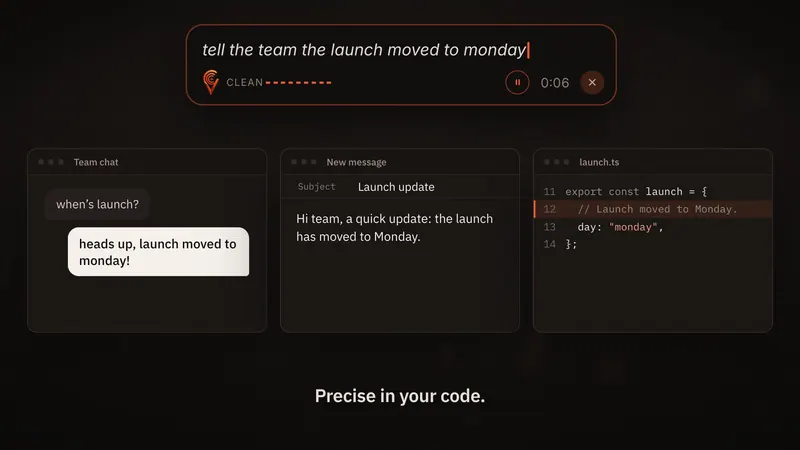
The same thought needs different words in different places. In the Clavox launch film, one sentence, “tell the team the launch moved to Monday”, lands as a casual chat message, a short email with a subject line, and a code comment.
Clavox has styles for this, including Clean, Professional, Email, Message and Notes. Notes turns a spoken list into bullet points. Email gives you a greeting and a sign-off. Clean simply tidies up what you said. You can also highlight text you’ve already written and tell Clavox what you want, such as “shorter” or “more formal”.
Why on-device matters for private voice to text
Confidential work stays confidential. Client details, health notes, contracts, unannounced plans: if you dictate them, they stay on your computer.
No connection needed. Because nothing is sent away, Clavox works without the internet after the first setup download. Read more about offline dictation.
Fast by design. With no upload and no wait for a reply, the text appears the moment you stop speaking.
How fast is voice to text compared with typing?
Most people type about 40 words a minute. Talking runs about 150. That’s why Clavox can be about four times faster than typing. Because it also removes fillers and fixes grammar, you don’t lose that time again editing the result.
Getting Clavox
Clavox launches on 18 November 2026, on Mac and Windows first, then Linux, iPhone and Android. See the details for Windows and Mac.
Every new install starts with a 7-day free trial with everything unlocked. A Clavox license is $59 for waitlist members at launch, then $79, and it includes every writing style and feature. You can use it on 2 computers at a time. Join the waitlist to get the launch price, or go back to the Clavox homepage.
Getting the best results from voice to text
- Talk naturally. Clavox is built for real speech, with pauses, fillers and changes of mind. You don’t need to dictate punctuation or speak slowly.
- Say the whole thought, then stop. The text lands when you stop speaking, so finishing a thought before you pause gives the cleanest result.
- Use the style that fits. Email for emails, Message for chat, Notes for lists, Professional for anything formal, Clean for everything else.
- Teach it your names. Correct a name once and Clavox remembers it.
- Use a headset in noisy places. Any decent microphone close to your mouth helps.
FAQ
Is Clavox voice to text really private?
Yes. Speech recognition and AI editing both run on your computer, and Clavox is built with no path for what you say to leave it. The Clavox app collects nothing.
Does Clavox store my recordings?
Nothing is uploaded to us or anyone else. 0 words are sent to us and 0 recordings are uploaded.
Which apps does it work in?
Any app you can type in: email, chat, documents, notes, browsers and code editors.
Does it work without the internet?
Yes. After the first setup download, dictation works fully offline.
What does it cost?
Every new install starts with a 7-day free trial. A Clavox license is $59 for waitlist members at launch, then $79, with a 14-day money-back guarantee.
Updated