

Windows
A dictation app for Windows that works offline
Clavox launches on Windows on 18 November 2026. It’s dictation software that types clean, ready-to-send text into any Windows app, and it does all of its work on your own PC.
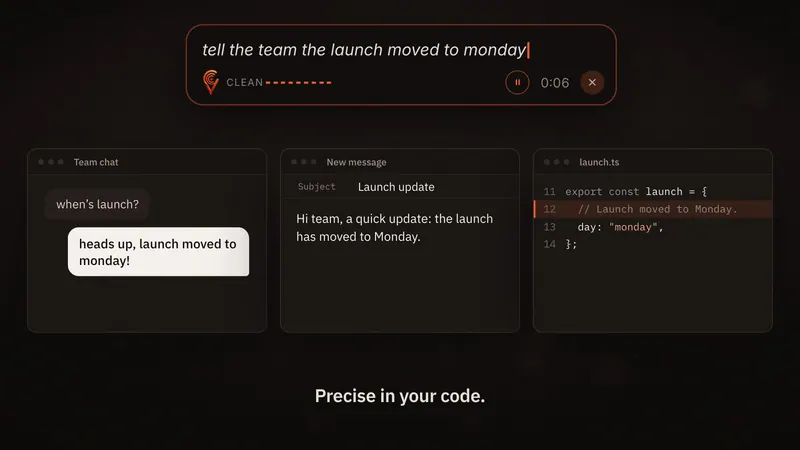
Dictation on Windows, done on your PC
Clavox is one of the first two platforms we’re launching on: Mac and Windows first, then Linux, iPhone and Android. On Windows, it works the way you’d want dictation software to work:
- Click into any text box: Outlook, Word, Teams, Slack, a browser, a code editor.
- Press the shortcut. On Windows, the one shown on our site is Ctrl + Space.
- Talk naturally.
- Stop. The clean version is typed where your cursor is.
Speech recognition and AI editing run on your PC. Your voice isn’t sent to us or to anyone else, and after the first setup download, dictation works fully offline.
Why Windows users want offline dictation
A lot of Windows work happens in offices, on laptops on the move, and on networks with strict rules about what leaves the machine. Dictation that uploads your voice is a problem in all three.
- On the move: a laptop on a train or a plane rarely has a connection you can rely on. Clavox doesn’t need one.
- At work: if you write about clients, colleagues or plans, you probably shouldn’t be sending recordings of it to a third party. With Clavox, 0 recordings are uploaded and 0 words are sent to us.
- Anywhere: there’s no round trip to a server, so text appears the moment you stop speaking.
Read more on how offline dictation works.
Dictation software that writes what you meant
Plain speech recognition gives you every word you said, in order, with no judgment. Clavox is voice intelligence: it writes what you meant, not just what you said.
- It drops filler words: um, uh, like, you know.
- It follows you when you change your mind, so “Thursday, no, Friday” comes out as Friday.
- It fixes grammar and punctuation.
- It shapes the text for the app: an email gets a greeting and sign-off, a chat message stays casual, notes become bullet points.
- “Scratch that” removes what you just said.
- It learns your names and words, so the colleague whose name you correct once is spelled right from then on.
Works in the Windows apps you already use
Clavox types into any app you can type in. On Windows that means Outlook, Word, Microsoft Teams, Slack, WhatsApp, Discord, Notion, Google Docs and Gmail in your browser, VS Code and Cursor, and everything else with a text cursor.
There’s nothing to copy and paste. You stay in the app you were already using.
How much time can you get back?
Most people type about 40 words a minute and speak at about 150, so talking is roughly four times faster. If you write 1,500 words on a typical workday, that’s about 27 minutes saved a day, or about 105 hours over a working year of 230 days. The speed test on our homepage uses your own typing speed if you’d like your number.
Built for people who write all day
- Email-heavy jobs: answer a full inbox by talking, with replies that are ready to send.
- Managers and teams: write updates and messages in Teams or Slack without breaking your train of thought.
- Writers: draft by talking. See Clavox for writers.
- Developers: dictate commit messages, docs, comments and prompts, with identifiers kept intact. See Clavox for developers.
Price, trial and launch
Clavox launches on 18 November 2026, streamed live on YouTube. Every new install starts with a 7-day free trial with everything unlocked. After that, a Clavox license is $59 for waitlist members at launch, then $79. Your license works on 2 computers at a time, and future versions are included as they’re released, including Linux and the phone apps when they launch. There’s a 14-day money-back guarantee.
Join the waitlist to lock in $59. Using a Mac too? See Clavox for Mac.
Setting up Clavox on Windows
- Install Clavox and open it.
- Check your microphone. If you have more than one, choose the one you want in Windows Settings, under System, then Sound, then Input.
- Let the first setup download finish. After that, dictation works without the internet.
- Try it in Notepad or Outlook. Press Ctrl + Space, say a sentence with an “um” and a change of mind, and see what Clavox types.
Tips for dictating at work
- A headset helps in an open office. It picks up your voice, not the conversation at the next desk.
- Speak in whole thoughts. Clavox works best when you talk naturally, not word by word.
- Pick the style before a burst of writing. Email for a run of replies, Message for Teams and Slack.
- Change your mind out loud. Say “no, actually” or “scratch that” and keep going; Clavox sorts it out.
FAQ
Does Clavox work on Windows?
Yes. Clavox launches on Mac and Windows first, on 18 November 2026, then Linux, iPhone and Android.
What is the dictation shortcut on Windows?
The shortcut shown on our site for Windows is Ctrl + Space. Press it, talk, and Clavox types the clean text into the app you’re in.
Does Clavox on Windows need the internet?
Only for the first setup download. After that, dictation works fully offline, because speech recognition and AI editing run on your PC.
Is my voice sent to Microsoft or anyone else?
Clavox doesn’t send your voice anywhere. It runs entirely on your computer, and the Clavox app collects nothing.
Can I use one license on a Windows PC and a Mac?
Your Clavox license lets you use Clavox on 2 computers at a time.
Updated