

Developers
Voice typing for developers, with your identifiers intact
Developers write a lot more prose than code: commit messages, pull request descriptions, docs, comments, tickets, chat, and long instructions to AI assistants. Clavox lets you say all of it, and its Code style keeps the technical parts exactly right.
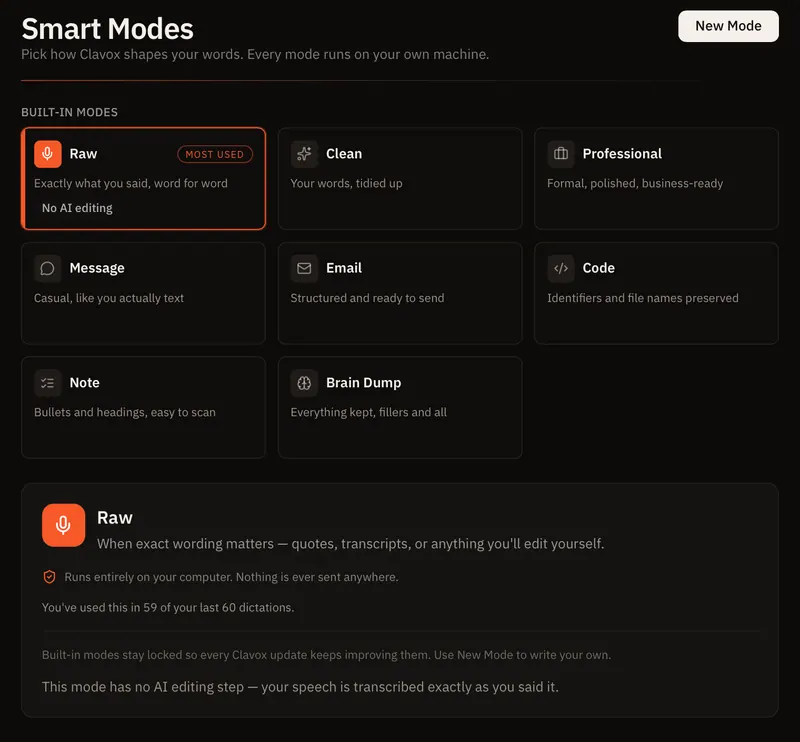
Why ordinary dictation fails developers
General-purpose dictation is tuned for everyday language. Say “use state” and you might get “you state”. Say a function name and you get three separate words. Say a file name and the extension disappears. Fixing those mistakes takes longer than typing would have, so most developers give up on dictation quickly.
Clavox has a style built for this. It’s called Code, and on the Modes screen it’s described in five words: identifiers and file names preserved.
What the Code style does
When you dictate with the Code style, Clavox:
- Removes filler words, like every other Clavox style.
- Keeps technical terms, library names and acronyms exactly as you say them. It never “autocorrects” technical vocabulary into everyday words.
- Keeps identifiers in their case. camelCase, snake_case, PascalCase and kebab-case names come out the way you said them.
- Turns a described name into an identifier. Say “handle click function” and you get
handleClick. Say “is login error variable” and you getisLoginError. - Writes code comments when you’re describing code. A sentence that starts with “this function”, “TODO”, “FIXME”, “NOTE” or “HACK” comes out as a
//comment. - Tags file names. Say a file name ending in an extension like .ts, .py, .rs, .go, .css, .json or .md and Clavox writes it with an @ in front, such as
@auth.ts, which is how many AI coding chats refer to files. - Leaves instructions to an AI assistant as plain text. It doesn’t turn your prompt into a comment.
- Adds nothing you didn’t say. No extra prose, no preamble.
In the Clavox launch film, the sentence “tell the team the launch moved to Monday” is typed into a code file as // Launch moved to Monday.
Where developers use it
Clavox types into any app you can type in, so you use it where you already work:
- Your editor: comments, docstrings and READMEs in VS Code or Cursor.
- Prompts for AI assistants: long, specific instructions are much faster to say than to type, and the more context you give, the better the answer. Clavox keeps the file names and identifiers in them exact.
- Git and code review: commit messages, pull request descriptions and review comments.
- Team chat and tickets: Slack, Discord, Microsoft Teams, issue trackers, with the Message or Professional style.
- Docs: design notes and documentation, with the Clean or Notes style.
Your code stays on your machine
Developers often can’t paste company code or internal plans into a third-party service, and they shouldn’t have to dictate them into one either. Clavox runs speech recognition and AI editing on your computer. 0 words are sent to us, 0 recordings are uploaded, and there’s 0 tracking in the app.
That also means it works without the internet after the first setup download: on a flight, on a train, or on a locked-down network. More on that in offline dictation and private voice to text.
Faster than typing, even for fast typists
Developers tend to be quick typists, but speech is still faster. Most people type about 40 words a minute and speak at about 150. The bigger win is often not speed but flow: you can explain a bug, a design or a prompt out loud the way you’d explain it to a colleague, without stopping to type and retype.
A typical session
- You’re in Cursor. You press the shortcut (Option + Space on a Mac, Ctrl + Space on Windows, as shown on our site) and say what you want the assistant to change, naming the files involved.
- Clavox types your instruction into the chat with the file names tagged and identifiers intact.
- You switch to the terminal’s commit message, press the shortcut again and describe the change.
- You switch to Slack and tell the team in a casual message.
Same voice, the right words for each place.
Getting Clavox
Clavox launches on 18 November 2026, on Mac and Windows first, then Linux, iPhone and Android, each included with your Clavox license as it’s released. Every new install starts with a 7-day free trial with everything unlocked. A Clavox license is $59 for waitlist members at launch, then $79, and works on 2 computers at a time.
Join the waitlist, or read more on the Clavox homepage.
Tips for dictating technical text
- Say the kind of name you mean. “Fetch user profile function” gives the Code style the cue to write
fetchUserProfile. - Say file names with their extension. “auth dot ts” is clearer than “the auth file”.
- Switch styles for prose. Use Code in the editor and in AI chats; use Message or Professional for Slack and tickets.
- Use Raw when you want every word. Raw has no AI editing step: your speech is transcribed exactly as you said it.
FAQ
Does Clavox have a mode for code?
Yes. The Code style keeps identifiers and file names exactly as you say them, keeps technical terms and library names exact, and removes fillers.
Will it turn “handle click function” into handleClick?
Yes. When you describe a variable, function, class, method, property or constant name, the Code style writes it as a camelCase identifier.
Does it work in VS Code and Cursor?
Yes. Clavox types into any app you can type in, including VS Code and Cursor.
Does my code or voice leave my computer?
No. Speech recognition and AI editing both run on your computer, and the Clavox app collects nothing.
Does it work offline?
Yes. After the first setup download, dictation works fully offline.
Updated