

Mac
A dictation app for Mac that writes what you mean
Clavox launches on the Mac on 18 November 2026. Press one shortcut, speak the way you think, and clean, ready-to-send text appears in whatever app you’re using. All of it happens on your Mac.
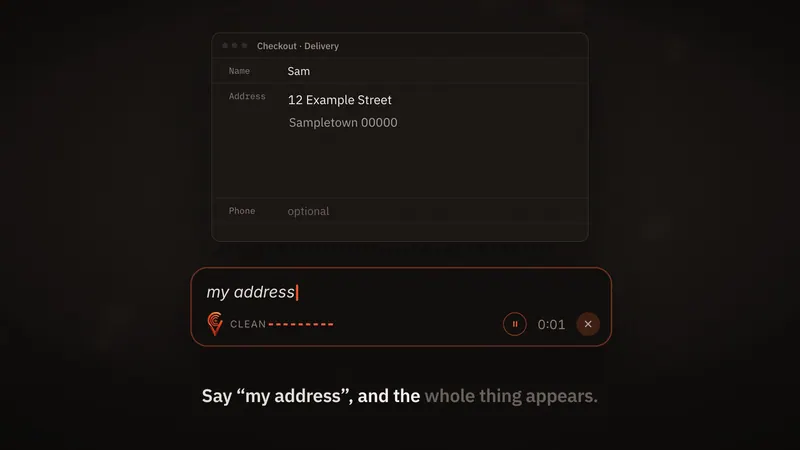
How Clavox works on a Mac
Clavox sits quietly in the background until you need it.
- Click into any text field: Mail, Messages, Notes, Slack, Notion, Google Docs in Safari or Chrome, a code editor.
- Press the shortcut. On a Mac, the one shown on our site is Option + Space.
- Talk the way you’d explain it to a friend.
- Stop. Clavox types the clean version where your cursor is.
Speech recognition and AI editing run on your Mac. Your voice never leaves it, and after the first setup download, dictation works fully offline.
A Mac dictation app that edits as it writes
The hard part of dictation was never turning sound into words. It’s that people don’t speak in finished sentences. We pause, say “um”, start again, change our minds. Plain speech to text keeps all of it, so you end up fixing the text by hand.
Clavox writes what you meant:
- Fillers removed. No ums, uhs or “you know”s.
- Changes of mind followed. “Let’s meet at two, no, actually three” becomes “Let’s meet at three.”
- Grammar and punctuation fixed.
- Lists organised. Say a list out loud and the Notes style turns it into bullet points.
- “Scratch that” removes what you just said.
- Your names learned. Correct a name once and it’s spelled right from then on.
- Edits by voice. Highlight text and say what you want, such as “shorter” or “more formal”.
Styles for every app on your Mac
What you write in Messages shouldn’t read like what you write in Mail. Clavox has styles including Clean, Professional, Email, Message and Notes, so the same voice produces the right words for each place. There’s also a style for code, covered on our developers page.
Private by design, offline by default
On a Mac, a lot of what you type is personal: messages to family, notes to yourself, emails to clients. With Clavox:
- 0 words are sent to us.
- 0 recordings are uploaded.
- 0 tracking in the app.
Because nothing goes over the network, Clavox works on a plane, in a café with bad Wi-Fi, or anywhere else. Read more about offline dictation.
Who it’s for
- Writers who think faster than they type. See Clavox for writers.
- Founders, managers and freelancers who spend the day in Mail, Slack and docs.
- Developers who want to talk through commit messages, comments and prompts.
- Anyone whose hands or wrists are tired of the keyboard. Lean back and say it.
Faster than typing
Most people type about 40 words a minute. Speaking runs about 150. That makes Clavox about four times faster than typing for the same message, and because the text is already clean, you’re not spending the time you saved on editing. Try the speed test on our homepage.
Price, trial and launch
Clavox launches on 18 November 2026, on Mac and Windows first, then Linux, iPhone and Android. Every new install starts with a 7-day free trial with everything unlocked. A Clavox license is then $59 for waitlist members at launch, then $79. It includes every writing style and feature, future versions as they’re released, and use on 2 computers at a time, so your Mac and a Windows PC can share one license. There’s a 14-day money-back guarantee.
Join the waitlist to lock in $59. Also on Windows? See Clavox for Windows.
Setting up Clavox on a Mac
- Install Clavox and open it.
- Allow the microphone. macOS asks the first time an app wants to hear you. Clavox listens only while you’re dictating.
- Allow accessibility access when asked. That’s the macOS permission that lets an app type into other apps, so your words can land where your cursor is.
- Let the first setup download finish. After that, dictation works without the internet.
- Pick a style. Start with Clean, which tidies up what you said, and switch when you move to email or chat.
- Try it in Notes. Press the shortcut, say a sentence with an “um” in it, change your mind halfway, and see what Clavox types.
Tips for dictating on a Mac
- Say whole thoughts. You don’t need to speak slowly or word by word. Talk the way you would to a person.
- Change your mind out loud. “No, actually” and “scratch that” are part of how Clavox works, not mistakes.
- Match the style to the app. Email for Mail, Message for Messages and Slack, Notes for lists and outlines.
- Use a decent microphone in noisy places. The built-in microphone is fine in a quiet room; a headset helps in a café or an open office.
- Dictate first, polish later. Many people talk a draft out and then make small edits with the keyboard.
- Keep your hands free. Clavox types where your cursor is, so you can lean back, look up and talk, then glance at the result.
FAQ
Does Clavox work on Mac?
Yes. Clavox launches on Mac and Windows first, on 18 November 2026, then Linux, iPhone and Android.
What is the dictation shortcut on a Mac?
The shortcut shown on our site for the Mac is Option + Space.
Does Clavox send my voice to a server?
No. Speech recognition and AI editing both run on your Mac. Clavox is built with no path for what you say to leave it.
Does it work offline on a Mac?
Yes. After the first setup download, dictation works fully offline.
Which apps does Clavox work in on a Mac?
Any app you can type in, including Mail, Messages, Notes, Slack, Notion, browsers and code editors.
Updated