

Offline dictation
An offline dictation app that writes what you mean
Clavox is a dictation app that keeps working when the internet doesn’t. You press one shortcut, talk, and clean text appears wherever your cursor is. Your voice is turned into text on your own computer, so nothing you say is sent anywhere.
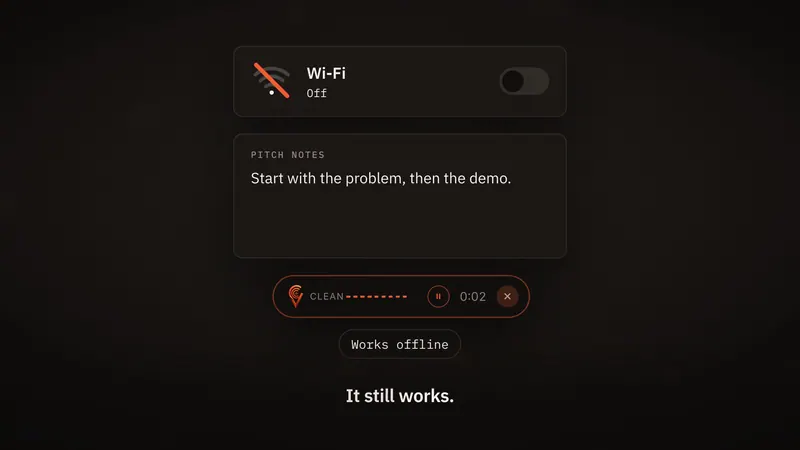
What “offline” means in Clavox
Most dictation tools record your voice and send it over the internet to a company’s servers. The words come back a moment later. That needs a connection, and it means your voice, and everything you said, has left your computer.
Clavox does all of that work on your own machine. Speech recognition and the AI editing that tidies up your words both run on your computer. After the first setup download, dictation works fully offline: on a plane, in a dead zone, on a train between stations, or anywhere the Wi-Fi gives up.
There is no “offline mode” to remember to switch on. Clavox is built this way from the start, and there is no path for what you say to leave your computer.
Why an offline dictation app is worth having
It works where you are. A lot of good thinking happens away from a fast connection: on the move, in a café with bad Wi-Fi, at home when the router drops. A dictation app that stops working at those moments is a dictation app you stop trusting.
What you say stays yours. You dictate things you would never post publicly: emails to clients, notes about people, plans that aren’t announced yet. With Clavox, none of it is uploaded. Sending your words to us or anyone else is architecturally impossible, so nobody can read them, sell them, or train on them.
There’s no round trip. Because nothing is sent away and back, your text appears the moment you stop speaking.
More than offline speech to text
Plain speech to text writes down every word you say, including the ums, the false starts and the sentence you changed halfway through. You then spend the time you saved fixing it.
Clavox is voice intelligence, not just dictation. It writes what you meant, not just what you said:
- It drops the ums and the “you know”s.
- It follows you when you change your mind. Say “Thursday, no wait, Friday” and you get Friday.
- It fixes the grammar and adds the punctuation.
- It shapes your words for where they’re going: an email, a message, notes, or a clean version of exactly what you said.
Here’s the difference. You say:
um hi Sarah so the deck is uh ready can we move the review to Thursday no Friday at ten thanks Samuel
Clavox types:
Hi Sarah,
The deck is ready. Can we move the review to Friday at 10?
Thanks,
Samuel
All of that happens on your computer, with no internet connection.
How it works, step by step
- Install Clavox on your Mac or Windows computer and do the first setup download. That is the one time it needs the internet for dictation.
- Put your cursor anywhere you type: an email, a chat, a document, a form, a code editor.
- Press the shortcut and talk. The shortcut shown on our site is Option + Space on a Mac and Ctrl + Space on Windows.
- Stop speaking. The clean version is typed straight into the app you’re in.
It works in the apps you already use, such as Gmail, Outlook, Slack, Notion, Google Docs, Word, WhatsApp, Microsoft Teams and Apple Mail. See private voice to text in any app for more on how that works.
How much faster is talking?
Most people type about 40 words a minute. Speaking runs at about 150. That’s why Clavox can be about four times faster than typing for the same message. Our homepage has a speed test if you’d like to race it yourself.
Speed only matters if the text is usable when it lands. Because Clavox removes fillers and fixes grammar as it writes, the text it types is ready to send, not a first draft to clean up.
Who an offline dictation app is for
- People who travel, or work from places where the connection comes and goes.
- Anyone who writes confidential things: client emails, internal notes, early plans. The Clavox app collects nothing.
- People who write a lot every day and want their hands and eyes off the keyboard.
- Writers and developers, who think faster than they type. See Clavox for writers and Clavox for developers.
Platforms and launch
Clavox launches on 18 November 2026, on Mac and Windows first, then Linux, iPhone and Android. Each of those is included with your Clavox license as it’s released. Read more about Clavox on Windows and Clavox on the Mac.
Every new install starts with a 7-day free trial with everything unlocked. After that, a Clavox license is $59 for waitlist members at launch, then $79. There’s a 14-day money-back guarantee, and you can use Clavox on 2 computers at a time. Join the waitlist to get the launch price.
FAQ
Does Clavox need the internet to work?
Only for the first setup download. After that, dictation works fully offline, on a plane, in a dead zone, anywhere.
Is my voice uploaded anywhere?
No. Speech recognition and AI editing both run on your computer. Clavox is built with no path for what you say to leave it, so nobody can read your words, sell them, or train on them.
Which computers does Clavox work on?
At launch, Clavox runs on Mac and Windows computers. Linux, iPhone and Android versions follow, included with your Clavox license as they’re released.
Does offline dictation work in every app?
Yes. Clavox types straight into any app you can type in, including email, chat, documents, notes and code editors.
Can I try it before I pay?
Yes. Every new install starts with a 7-day free trial with everything unlocked. If you buy and it still isn’t right, write to [email protected] within 14 days and we’ll refund you.
Updated