

Writers
Dictation for writers who think faster than they type
Most writers lose ideas between their head and the keyboard. Talking keeps up with your thinking. Clavox turns what you say into clean, punctuated text, in the app you already write in, without sending a word of your draft anywhere.
The problem with typing a first draft
You think in whole ideas. You type one letter at a time. Somewhere between your mind and the screen, you start cutting, and it’s rarely the dull thoughts you lose. It’s the better line, the bigger idea, the sentence you were halfway through when your fingers caught up.
Speaking closes that gap. Most people type about 40 words a minute and speak at about 150. When you say a draft out loud, you get closer to the way you actually think.
The catch has always been the mess. Plain dictation gives you every um and every false start, and you spend the time you saved cleaning it up. That’s the part Clavox fixes.
What Clavox does with what you say
Clavox is voice intelligence, not just dictation. It writes what you meant, not just what you said:
- It removes fillers. The ums, the uhs, the “sort of”s.
- It follows you when you change your mind. Say “in March, no, April” and you get April.
- It adds punctuation and fixes grammar as it writes.
- “Scratch that” removes what you just said, so you can try a sentence again.
- It learns your names and words: characters, places, people and terms you correct once.
- You can edit by voice. Highlight a paragraph and say “shorter” or “more formal”.
If you want every word exactly as spoken, for an interview transcript or a quote, the Raw style keeps exactly what you said, with no AI editing. Brain Dump keeps everything, fillers and all.
Styles for every kind of writing
Writers write more than manuscripts. Clavox has styles including:
- Clean for drafts: your words, tidied up.
- Notes for research and outlines: a spoken ramble becomes headings and bullet points.
- Email for pitches, submissions and replies, with a greeting and sign-off.
- Professional for anything formal.
- Message for quick, casual replies.
In the Clavox launch film, a spoken packing list (“passports, chargers, and, oh, the tickets”) comes back as a tidy bulleted note. The same thing works for a chapter outline.
Write anywhere you already write
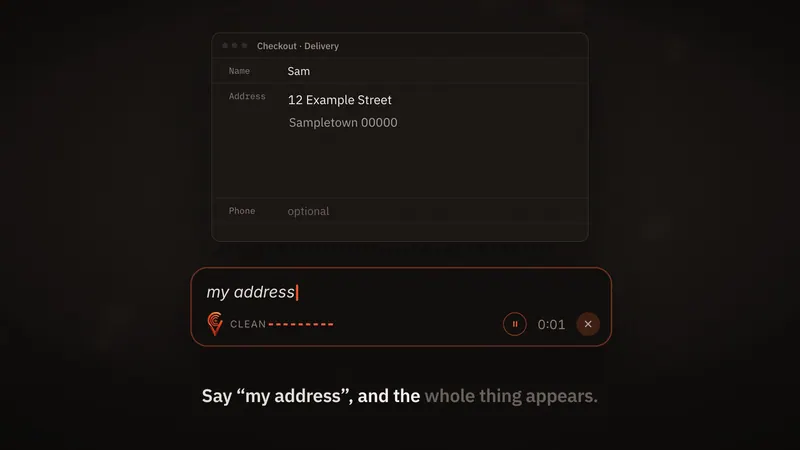
Clavox types straight into any app you can type in: Google Docs, Word, Notion, Obsidian, Apple Notes, your email, or a writing app of your choice. There’s no separate dictation window and nothing to copy and paste. Put your cursor where the words should go, press the shortcut and talk.
Your draft stays private
Unpublished work is valuable, and you shouldn’t have to trust a stranger’s server with it. Clavox runs speech recognition and AI editing on your own computer. 0 words are sent to us, 0 recordings are uploaded, and nobody can read your words, sell them, or train on them.
It also means Clavox works offline after the first setup download, so you can write by voice on a train, in a cabin, or on a plane. Read more about offline dictation and private voice to text.
A way to try it
- Open your document and put the cursor at the end.
- Press the shortcut and say the next paragraph out loud, the way you’d tell it to a friend.
- Don’t stop to fix anything. Change your mind out loud if you need to.
- Stop speaking and read what Clavox wrote.
Many writers find it easiest to dictate the first draft and edit with the keyboard. Others talk through notes and outlines and type the final prose. Clavox works for both.
Your body will thank you
Long writing days are hard on wrists, shoulders and eyes. With Clavox you can lean back, look up and talk. You choose when to use the keyboard, rather than needing it for every word.
Getting Clavox
Clavox launches on 18 November 2026, on Mac and Windows first, then Linux, iPhone and Android. See Clavox for Mac and Clavox for Windows. Every new install starts with a 7-day free trial with everything unlocked; a Clavox license is $59 for waitlist members at launch, then $79.
Join the waitlist to lock in $59, or see the Clavox homepage.
Habits that help when you write by voice
- Talk to someone. Imagine explaining the scene or the argument to a friend across the table. It keeps your sentences natural.
- Don’t stop to fix things. Keep going. Change your mind out loud, or say “scratch that” and try again.
- Dictate in short sessions. Ten minutes of talking can produce more first-draft words than an hour of typing, and you’ll still have energy to edit.
- Use Notes for structure. Talk through an outline or research notes and let the Notes style turn them into headings and bullet points.
- Teach it your world. Correct a character or place name once and Clavox keeps it.
FAQ
Is dictation good for writing a first draft?
For many writers, yes. Speaking runs about 150 words a minute against about 40 for typing, so you get ideas down before they slip away. Clavox removes fillers and adds punctuation, so the draft is readable straight away.
Can I keep exactly what I said, word for word?
Yes. The Raw style keeps exactly what you said, with no AI editing.
Does Clavox work in Google Docs, Word and Notion?
Yes. Clavox types into any app you can type in.
Is my unpublished writing uploaded anywhere?
No. Everything runs on your computer, and the Clavox app collects nothing.
Does Clavox learn character and place names?
Yes. Correct a name once and Clavox spells it right from then on.
Updated